Choosing a PoE switch for a home lab: ports, power budget and SNMP
A PoE switch for a home lab is decided by four things: how many ports deliver power, how many watts the switch can hand out in total, what your devices reserve by class (not what they draw), and whether the switch answers SNMP. For most labs that means an 8-port PoE switch with four PoE+ ports, a budget at least 20 percent above the class total of everything you plug in, SNMP v3 so the monitor sees every powered port, and no fan. Run your device list through the PoE budget calculator before you shop, because the budget is where small switches run out first.
Affiliate links: we may earn a commission. As an Amazon Associate I earn from qualifying purchases. We also earn from qualifying purchases on eBay.
rack picks
| layer | pick | why | Link |
|---|---|---|---|
| L2 · core | 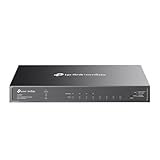 TP-Link Omada SG2008P smart PoE switch TP-Link Omada SG2008P smart PoE switch | A smart switch that speaks SNMP, so the monitor can graph every port it powers. | Amazon › |
| L2 · lean |  TP-Link 5-port Easy Smart PoE switch, 120 W TP-Link 5-port Easy Smart PoE switch, 120 W | A small managed PoE switch with room in the budget for PoE+ access points. | Amazon › |
| L2 · 16 port |  NETGEAR GS316PP 16-port PoE+ switch NETGEAR GS316PP 16-port PoE+ switch | Sixteen powered ports with a 183 W budget and no fan: cameras and access points without the noise. | Amazon › |
Start with the list, then three questions
List every device that will take power from the switch, then ask three questions.
- What class does each device ask for? The datasheet gives it, or gives the standard and leaves you to infer it. A device whose sheet names no class counts as Class 0: 15.4 W.
- How many ports do you need in all? The powered devices, the uplink, anything unpowered in the same closet, and two spare.
- Will this switch be in your monitoring? If yes, SNMP is the first line you read on the spec sheet.
Budget in watts at the switch port
The figure that matters is the power the switch sets aside at the port (the PSE side), not what the device uses at the far end of the cable. A device announces its class when it connects, and a switch that allocates by class takes the full class figure out of its budget whether the device uses it or not: 4 W for Class 1, 7 W for Class 2, 15.4 W for Class 0 or 3, and 30 W for Class 4, which is PoE+.
A concrete case: a Wi-Fi 6 ceiling access point such as the EAP650 (Amazon ›) lists 802.3at PoE as its power input and, on TP-Link's page for the current hardware version, a maximum consumption of 15.5 W. Plan it as Class 4 anyway. Two of them draw at most 31 W, but a class-based switch reserves 60 W, and the 60 W is what fills the budget.
Some switches allocate by measured draw instead. Budget with the class figure anyway, since it is the worst case, and keep about 20 percent free for next year's device.
| Switch PoE budget | Usable with 20 percent free | PoE+ devices at 30 W (no headroom) |
|---|---|---|
| 62 W | 49.6 W | 1 (2) |
| 120 W | 96 W | 3 (4) |
| 183 W | 146.4 W | 4 (6) |
So a typical 62 W 8-port PoE switch carries one PoE+ access point with room to spare, or two with none. One access point plus a camera with no class on its datasheet is 45.4 W, inside the 49.6 W line. Two access points and that camera are 75.4 W, a job for the 120 W size.
Those watts also come out of the wall. On a UPS, add the PoE total to the switch's own draw when you size the UPS.
How many ports to buy
Total ports and powered ports are separate lines on the spec sheet, and the second is often half the first. The SG2008P (Amazon ›) powers ports 1 to 4 and leaves 5 to 8 as plain gigabit. That split suits a lab: four powered ports for access points, cameras or a Raspberry Pi with a PoE+ HAT, and four for the uplink, the monitoring host and the rest of the shelf.
Read port count and budget together. A 16-port switch with sixteen PoE+ ports and 183 W can give 30 W by class to six ports at once, four with headroom. That suits a row of unclassified cameras at 15.4 W each, not a row of access points.
A PoE port is safe for a device that wants no power: a standard port switches power on only after it detects a valid powered-device signature, so a NAS on a PoE port simply gets data. And if the count comes to nine, buy a 16-port switch rather than chaining a second eight: every extra switch is another uplink, power brick and device to poll.
PoE+ or PoE++
A PoE+ switch (802.3at) delivers up to 30 W per port and powers Classes 0 to 4, which covers most access points, cameras, phones and PoE HATs in a home lab. "PoE++" is the informal name for 802.3bt, which adds Classes 5 to 8 (45 to 90 W at the port, over all four pairs); you need it only when a datasheet on your list asks for one of those classes.
Managed PoE switch or unmanaged
There are three tiers, and for monitoring the split that matters is between the second and the third.
Unmanaged switches do power and switching and nothing else. NETGEAR's GS316PP (Amazon ›) is the large example: sixteen PoE+ ports, a 183 W budget, no fan, nothing to configure or poll.
Web-managed switches, sold as TP-Link Easy Smart or NETGEAR Plus, add VLANs and often per-port PoE controls; NETGEAR's page for the 8-port GS308EP lists PoE prioritization and a power limit per port. What their PoE models do not list, at the time of writing, is SNMP. NETGEAR's 8-port PoE Plus switch (Amazon ›) and TP-Link's Easy Smart PoE models are configured through a browser or a vendor utility, and that page is your only view into them.
Smart switches, such as TP-Link's Omada SG2008P, add SNMP v1, v2c and v3, RMON and LACP, according to the spec page, plus optional management from an Omada controller.
If the lab exists partly to learn monitoring, buy a managed PoE switch with SNMP, for the reasons in the managed switch guide. If the switch only powers cameras on their own network, an unmanaged one fed from a single access port on a managed switch is enough, since everything plugged into it lands in that port's VLAN. The home VLAN plan shows where cameras and IoT gear usually go.
Fan noise
All four switches in the Rack list below are fanless according to their makers, the 183 W GS316PP included. Fans tend to arrive as budgets climb toward 24 ports and several hundred watts, which is fine in a basement rack and not in a home office.
Fanless is not the same as cool. The case is the heat sink, so mount the switch with air around it and keep the top clear. If it reports a temperature over SNMP, graph it through the first warm week.
A PoE+ switch, need by need
What to look for in a PoE+ switch for a home lab, row by row:
| Need | What to look for | Why |
|---|---|---|
| Access points, cameras, PoE HATs | PoE+ (802.3at) ports, 30 W each | Covers Classes 0 to 4, where most home PoE gear sits |
| Enough power | PoE budget above your class total plus 20 percent | The switch reserves by class, not by measured draw |
| Enough powered ports | Powered-port count, read apart from total ports | Many 8-port PoE switches power only four |
| Graphs and alerts | SNMP v2c and v3 on the spec sheet | Link state and counters for every powered device |
| PoE readings in the monitor | Power Ethernet MIB (RFC 3621) or a documented vendor MIB | Budget, draw and per-port faults over SNMP |
| A quiet room | Fanless design with air around it | No fan noise where people work |
| Devices above 30 W | 802.3bt ports and a budget to match | Classes 5 to 8 need four-pair power |
The Rack list
Four switches, in order: the one I would start a monitored lab with, a leaner 5-port with more power but nothing to poll, the unmanaged step up in ports and watts, and an 8-port Easy Smart for a shelf you will never graph.
rack list
- TP-Link Omada SG2008P smart PoE switch8 x 1 GbE4 x PoE+SNMP v1/v2c/v3Omada managedA smart switch that speaks SNMP, so the monitor can graph every port it powers.Amazon ›
- TP-Link 5-port Easy Smart PoE switch, 120 W5 x 1 GbE4 x PoE+120 W budgetVLANsA small managed PoE switch with room in the budget for PoE+ access points.Amazon ›
- NETGEAR GS316PP 16-port PoE+ switch16 x 1 GbE PoE+183 W budgetfanlessunmanagedSixteen powered ports with a 183 W budget and no fan: cameras and access points without the noise.Amazon ›
 TP-Link 8-port Easy Smart PoE switch8 x 1 GbE4 x PoEVLANsno SNMPFour PoE ports plus four plain ports, with VLANs, for a small closet.Amazon ›
Chosen from specifications and published reviews, not bench-tested by us.
How these were chosen: from the makers' spec pages and what owners and reviewers have published, with no bench time of my own behind any of them. TP-Link now sells this switch as the Omada SG2008P (Amazon still lists it as the TL-SG2008P), and its current page keeps four PoE+ ports, a 62 W budget, SNMP v1, v2c and v3 and a fanless case, so the numbers here apply to either name.
How they fit together: the SG2008P covers one PoE+ access point and a camera, with SNMP on every port. Two access points and two smaller loads need the 5-port Easy Smart's 120 W, but without SNMP, so watch its uplink from a monitored switch upstream. The GS316PP is for a camera wall. For the 8-port Easy Smart, TP-Link's page for hardware version 5 lists four PoE+ ports at up to 30 W and a 64 W budget; earlier versions differ.
Setup and monitoring notes
Put the management interface in your management VLAN with a fixed address, and point it at your NTP server. On the SG2008P in standalone mode, enable SNMPv3 at authPriv with SHA and AES and a read-only user; if an Omada controller has adopted the switch, set SNMP there. Two layers of data then come off a PoE switch.
The interface layer is standard, and on a PoE switch it doubles as a power monitor. A camera port whose ifOperStatus (1.3.6.1.2.1.2.2.1.8) drops and returns every night is usually a device browning out when its infrared lights come on, or a budget cut too fine. ifInErrors (1.3.6.1.2.1.2.2.1.14) climbing on one powered port points at the cable. For traffic, poll the 64-bit ifHCInOctets (1.3.6.1.2.1.31.1.1.1.6); the interface counters explainer covers why.
The power layer depends on the MIBs the switch implements. The standard one is POWER-ETHERNET-MIB, RFC 3621, under 1.3.6.1.2.1.105:
| Object | OID | What it gives you |
|---|---|---|
pethMainPsePower |
1.3.6.1.2.1.105.1.3.1.1.2 | Nominal PoE budget, in watts |
pethMainPseConsumptionPower |
1.3.6.1.2.1.105.1.3.1.1.4 | Measured draw for the whole switch, in watts |
pethPsePortDetectionStatus |
1.3.6.1.2.1.105.1.1.1.6 | Per port: searching, deliveringPower, fault and three other states |
pethPsePortOverLoadCounter |
1.3.6.1.2.1.105.1.1.1.13 | Per port: a count of overload events |
The standard has no per-port watts object; where a switch reports per-port watts, they come from the vendor's private MIB. So read the MIB list before you buy if PoE graphs matter. The SG2008P's page lists MIB-II, Bridge, Q-Bridge, RMON and TP-Link private MIBs, and no Power Ethernet MIB: its interface counters are certain, its PoE readings over SNMP something to confirm with a walk.
snmpwalk -v3 -l authPriv -u monitor -a SHA -A "$AUTH_PASS" -x AES -X "$PRIV_PASS" \
  192.168.10.2 1.3.6.1.2.1.105
An empty answer or "No Such Object" means the standard MIB is missing; load the vendor's MIB files and look under 1.3.6.1.4.1. Where readings exist, alert on consumption crossing your usable figure (80 percent of the budget), and on any port that leaves deliveringPower for fault.
When to spend more
- A device on your list asks for Class 5 to 8. That means 802.3bt ports, and a budget that carries them with 20 percent free.
- The class total passes about 150 W, or you need more than a dozen ports. That is a 24-port PoE switch, which often brings a fan, so decide first where it lives.
- You want per-port watts in the monitor. Buy a switch whose MIB documentation names PoE objects.
Short of those, an 8-port PoE switch with four PoE+ ports, SNMP and no fan is where I would start. Write the class next to every device on your list, add up the column, and put the total into the calculator before you order anything.
bill of materials
- 01TP-Link Omada SG2008P smart PoE switchAmazon ›
- 02TP-Link 5-port Easy Smart PoE switch, 120 WAmazon ›
- 03NETGEAR GS316PP 16-port PoE+ switchAmazon ›
- 04
 TP-Link Omada EAP650 Wi-Fi 6 access pointAmazon ›
 - 05
 NETGEAR 8-port PoE Plus switchAmazon ›
 - 06TP-Link 8-port Easy Smart PoE switchAmazon ›
Used gear on eBay: used managed switches · used 10G SFP+ NICs
next: PoE budget calculator for the numbers, the Rack list for the gear