
snmpwalk command examples for v2c and v3, with the output explained
Here is the snmpwalk command most people came for. The first line walks the system group of a switch at
10.20.0.2 with SNMP v2c; the second does the same with SNMPv3 at the authPriv level, which is the one to use
anywhere the traffic leaves a management network:
snmpwalk -v2c -c n0c-r34d 10.20.0.2 system

snmpwalk -v3 -l authPriv -u monitor -a SHA -A 'long-auth-passphrase' \
  -x AES -X 'different-priv-passphrase' 10.20.0.2 system
Affiliate links: we may earn a commission. As an Amazon Associate I earn from qualifying purchases. We also earn from qualifying purchases on eBay.
rack list
 TCP/IP Illustrated, Volume 12nd editionprotocolsAddison-WesleyThe reference for how the protocols behave on the wire, packet by packet.Amazon price @ Oct 21, 2026, 12:29 PM ET: $64.49Amazon ›
- TP-Link Omada TL-SG2008 smart switch8 x 1 GbESNMP v1/v2c/v3VLANs, LACPfanlessThe non-PoE sibling: VLANs, LACP and SNMP in a small fanless box.Amazon ›
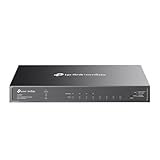 TP-Link Omada SG2008P smart PoE switch8 x 1 GbE4 x PoE+SNMP v1/v2c/v3Omada managedA smart switch that speaks SNMP, so the monitor can graph every port it powers.Amazon price @ Oct 21, 2026, 12:29 PM ET: $89.99Amazon ›
Chosen from specifications and published reviews, not bench-tested by us.
Product prices and availability are accurate as of the date/time indicated and are subject to change.
The shape never changes: snmpwalk [options] agent [OID]. The agent is an address or hostname, with a port
appended if the agent does not listen on 161 (10.20.0.2:1161). The OID is either a name from a loaded MIB
(system, IF-MIB::ifName) or numeric (1.3.6.1.2.1.1). Leave it out and net-snmp walks the whole mib-2
subtree, 1.3.6.1.2.1, which on a 48-port access switch runs to thousands of lines. The tools come from
Net-SNMP: the snmp package on Debian and Ubuntu, net-snmp-utils on the Red Hat
family.
n0c-r34d is a made-up read-only community. If your devices still answer to public, fix that before you
script anything, and keep v2c on a network that only your pollers can reach.
The snmpwalk command, flag by flag
| Flag | What it sets | Typical value |
|---|---|---|
-v |
Protocol version | 1, 2c or 3 |
-c |
Community string (v1 and v2c only) | n0c-r34d |
-u |
SNMPv3 user name | monitor |
-l |
SNMPv3 security level | noAuthNoPriv, authNoPriv, authPriv |
-a |
Authentication protocol | SHA (MD5 on old gear) |
-A |
Authentication passphrase, 8 characters minimum | |
-x |
Privacy protocol | AES (AES-128) or DES |
-X |
Privacy passphrase | |
-n |
SNMPv3 context name | vendor specific |
-t |
Seconds to wait for each try | default 1 |
-r |
Retries after the first try | default 5 |
-O |
Output format | n, q, s, v, t, e |
-C |
Walk behavior | p, c, E, I |
-m, -M |
MIB modules to load, directories to search | +LLDP-MIB, +$HOME/mibs |
The defaults for -t and -r explain a familiar delay: one second per try and five retries means a silent agent
costs six seconds before you see a timeout. In a loop over two hundred devices, -t 2 -r 1 is kinder. At the time
of writing, recent net-snmp releases also accept SHA-2 variants such as SHA-256 and SHA-512 for -a
(RFC 7860), and some builds offer AES-192 and AES-256 for -x. Use them
only where the agent supports the same thing, or you will spend an afternoon on a mismatch that looks like a
wrong password.
snmpwalk examples for SNMP v2c
Five walks I run on almost every new switch, read-only community, device at 10.20.0.2:
# Name, description, uptime, contact and location
snmpwalk -v2c -c n0c-r34d 10.20.0.2 system

# Port names, the descriptions people typed, and link state
snmpwalk -v2c -c n0c-r34d 10.20.0.2 IF-MIB::ifName
snmpwalk -v2c -c n0c-r34d 10.20.0.2 IF-MIB::ifAlias
snmpwalk -v2c -c n0c-r34d 10.20.0.2 IF-MIB::ifOperStatus

# 64-bit inbound octet counters by numeric OID (ifHCInOctets)
snmpwalk -v2c -c n0c-r34d 10.20.0.2 1.3.6.1.2.1.31.1.1.1.6
You can also walk a single instance, such as the counter for ifIndex 3:
snmpwalk -v2c -c n0c-r34d 10.20.0.2 IF-MIB::ifHCInOctets.3
That works because snmpwalk, when nothing lies below the OID you gave, fetches the OID itself. -CI turns that
off. For one value, snmpget is the honest tool, but the walk form saves retyping in a hurry.
-CE stops a walk at a given OID. On a Linux server running net-snmp's agent, this prints the system group
without the long sysORTable that follows it:
snmpwalk -v2c -c n0c-r34d -Os -CE sysORTable 10.20.4.11 system
Vendor MIBs need loading. Put the files in a directory and name the module:
snmpwalk -v2c -c n0c-r34d -M +$HOME/mibs -m +LLDP-MIB 10.20.0.2 LLDP-MIB::lldpRemSysName
Without the file you get Cannot find module (LLDP-MIB) followed by Unknown Object Identifier. The numeric OID
always works without any MIB file; you just get numbers back instead of names.
snmpwalk examples for SNMPv3
# authPriv: signed and encrypted. The normal case.
snmpwalk -v3 -l authPriv -u monitor -a SHA -A 'long-auth-passphrase' \
  -x AES -X 'different-priv-passphrase' 10.20.0.2 IF-MIB::ifName

# authNoPriv: signed, readable on the wire. Only if the user's group allows it.
snmpwalk -v3 -l authNoPriv -u monitor -a SHA -A 'long-auth-passphrase' 10.20.0.2 sysUpTime
A few rules hold for every v3 walk:
- Use
authPriv.noAuthNoPrivis a user name and nothing else, no better than a community string. - The protocols must match the ones the user was created with on the agent. An
MD5user queried with-a SHAfails exactly like a wrong passphrase. - Passphrases shorter than eight characters are refused by the client before anything is sent:
passphrase chosen is below the length requirements of the USM (min=8). - Passphrases typed on the command line land in shell history and in
psoutput. Move them into~/.snmp/snmp.conf, as described in the SNMP versions article, and the command shrinks tosnmpwalk 10.20.0.2 IF-MIB::ifName. - Some switches expose per-VLAN tables through a v3 context set with
-n; the vendor documents the names.
SNMPv3 changes the wrapper, not the questions. The OIDs and the output below are the same whichever version you ask with.
Reading snmpwalk output
A walk of system on a Linux server looks like this:
SNMPv2-MIB::sysDescr.0 = STRING: Linux mon-01 6.1.0-18-amd64 #1 SMP PREEMPT_DYNAMIC Debian 6.1.76-1 (2024-02-01) x86_64
SNMPv2-MIB::sysObjectID.0 = OID: NET-SNMP-MIB::netSnmpAgentOIDs.10
DISMAN-EVENT-MIB::sysUpTimeInstance = Timeticks: (123456789) 14 days, 6:56:07.89
SNMPv2-MIB::sysContact.0 = STRING: noc@example.net
SNMPv2-MIB::sysName.0 = STRING: mon-01
SNMPv2-MIB::sysLocation.0 = STRING: Building B, IDF 2
Take one line from an interface walk apart, IF-MIB::ifOperStatus.3 = INTEGER: up(1):
IF-MIBis the MIB module that defines the object.ifOperStatusis the object, here a column ofifTable..3is the instance. In a table it is the row index, so this is ifIndex 3. Scalars always end in.0.INTEGERis the SMI type.up(1)is the value, with the label net-snmp found in the MIB. The wire carries only the 1.
The third line above has a quirk worth knowing. sysUpTime.0 (1.3.6.1.2.1.1.3.0) prints as
DISMAN-EVENT-MIB::sysUpTimeInstance because that module defines an alias for the same OID and net-snmp loads it
by default. Same object, different label. With -On it shows as .1.3.6.1.2.1.1.3.0 again.
| Type in the output | What it holds | Watch for |
|---|---|---|
| STRING | Text, or bytes with a display hint | MAC addresses print as 0:a9:97:2b:ba:5e; -O0 keeps the leading zeros |
| Hex-STRING | Bytes that are not printable | Engine IDs, some serial numbers |
| INTEGER | A number, often an enumeration | -Oe prints the bare number |
| Counter32 | A 32-bit count that only rises and wraps at 4,294,967,295 | Only the difference between two polls means anything |
| Counter64 | A 64-bit count | Not visible over SNMPv1 at all |
| Gauge32 | A level that rises and falls | ifSpeed tops out at 4,294,967,295 bit/s; read ifHighSpeed (Mbit/s) for 10G ports |
| Timeticks | Hundredths of a second | (123456789) is the raw value: 14 days, 6:56:07.89 |
| OID | An object identifier as a value | sysObjectID identifies vendor and model |
| IpAddress | An IPv4 address | Also turns up inside the index of ARP and routing tables |
A single walk of ifHCInOctets tells you nothing about traffic. Take two walks a known number of seconds apart,
subtract, multiply by eight and divide by the seconds.
Interface counters explained covers the arithmetic and the wraps,
and the counter rate calculator does it for you.
Two messages look like values but are not:
No Such Object available on this agent at this OID: the agent does not implement that object, or the view your community or user may see leaves it out.No more variables left in this MIB View (It is past the end of the MIB tree): the walk ran off the end of everything you are allowed to see.
Output options for scripts: -On, -Oq, -Ov and friends
The default output is made for people. These switches make it fit for awk and shell loops:
$ snmpwalk -v2c -c n0c-r34d -On 10.20.4.11 sysUpTime
.1.3.6.1.2.1.1.3.0 = Timeticks: (93017) 0:15:30.17

$ snmpwalk -v2c -c n0c-r34d -Oq 10.20.4.11 sysName
SNMPv2-MIB::sysName.0 mon-01

$ snmpwalk -v2c -c n0c-r34d -Oqv 10.20.4.11 sysName
mon-01

$ snmpwalk -v2c -c n0c-r34d -Ot 10.20.4.11 sysUpTime
DISMAN-EVENT-MIB::sysUpTimeInstance = 93017

$ snmpwalk -v2c -c n0c-r34d -Os -Oe 10.20.0.2 ifOperStatus
ifOperStatus.1 = INTEGER: 1
ifOperStatus.2 = INTEGER: 2
-Oq drops the equals sign and the type, -OQ keeps the equals sign but drops the type, -Ov prints the value
alone, -Os keeps only the last part of the name, -On prints numeric OIDs and -Ot prints Timeticks as a raw
integer. Note that -Oq on its own prints Timeticks as 0:0:15:30.17 (days, hours, minutes, seconds), which no
script wants, so pair it with -Ot. The flags combine. This prints an ifIndex to port name map, one pair per line:
snmpwalk -v2c -c n0c-r34d -Oqs 10.20.0.2 IF-MIB::ifName | sed 's/^ifName\.//'
Two walk options help in scripts too: -Cp prints Variables found: 52 at the end, and -Ct prints the total
wall-clock time of the walk, which is the quickest way to spot an agent that is slowing your poller down.
snmpbulkwalk: the same walk in fewer requests
snmpbulkwalk takes the same options and prints the same output, but asks with GETBULK, so it fetches many rows
per round trip. It needs v2c or v3.
snmpbulkwalk -v2c -c n0c-r34d -Cr25 -Cp 10.20.0.2 IF-MIB::ifXTable
-Cr25 sets max-repetitions to 25; the default is 10. Across a WAN link the difference is large, and the
versions article linked above has the numbers along with the reasons not to set it to 500. The polling guide covers how a poller uses the same mechanism.
When snmpwalk fails
| What you see | Usual cause | What to try |
|---|---|---|
Timeout: No Response from 10.20.0.2 |
v2c: wrong community (agents drop those silently), an ACL, a firewall, the agent down or listening on localhost only. v3: wrong privacy passphrase or protocol | tcpdump -ni any udp port 161 on the poller; requests leaving with no replies point at the path or the agent's ACL |
Unknown user name |
The v3 user does not exist on that agent | Check the user list on the device |
Authentication failure (incorrect password, community or key) |
Wrong auth passphrase, or -a does not match |
Recheck both; MD5 against SHA is common on older gear |
Unknown Object Identifier |
The name is not in any loaded MIB | Use the numeric OID, or -m and -M |
No Such Object available on this agent at this OID |
Not implemented, or outside the allowed view | On a fresh Debian or Ubuntu snmpd, the default config shows only the systemonly view |
Error: OID not increasing |
The agent returned rows out of order | -Cc skips the check, but a broken agent can then loop |
An authorizationError |
The v3 security level is lower than the user's group requires | Raise -l to authPriv |
A walk of ifXTable with no HC counters |
You asked with -v1 |
Use v2c or v3 |
The Debian and Ubuntu default deserves a second mention because it catches everyone once: at the time of writing,
the packaged snmpd.conf listens on 127.0.0.1 only and limits the default community to the system group plus
the start of HOST-RESOURCES-MIB. A remote walk times out, and a local walk of ifTable returns No Such Object.
Both are configuration, not faults. More failure patterns, with the fix for each, are in the
troubleshooting handbook.
Lines worth keeping in your shell history
snmpwalk -v2c -c n0c-r34d HOST systemto prove the agent answers at all.snmpwalk ... -Os HOST IF-MIB::ifNameto match ifIndex numbers to port names before you graph anything.snmpbulkwalk ... -Cr25 HOST IF-MIB::ifXTablefor every port in one pass.- The v3
authPrivform of the first line, run against each new device before it joins the poller.
If the first one times out, stop and fix reachability and credentials. Nothing further down will work until it answers.
next: SNMP counter to bit rate for the numbers, the Rack list for the gear